
Mahjong

Tiles—
Moves0
Time0:00
MAHJONG
Solitaire
Turtle
Well Done!

Mahjong: Quick Guide and Game Info

Mahjong Solitaire is a single player tile-matching puzzle where the challenge isn’t simply finding two tiles that look alike. Tiles are stacked in layers, and many begin the game blocked by the tiles around or above them. You’ll need to gradually open up the layout, decide which available pairs to remove and avoid trapping tiles you’ll need later.

Every new board in our game is created with a solution, but your choices still matter. Remove pairs in the wrong order and you can reach a point where no matching moves are available.

About Our Mahjong Solitaire Game

This is the 20th game I created! You have sixteen layouts to choose from. You use the arrows on the start screen to browse the layouts and you can see a preview of the layout before you make your choice. I had a little assistance creating this game but I made some looks and usability changes to make it part of our game family, so to say.
During play you’ll notice a tracker keeping time, moves and tiles remaining. You can use the hint button at will but there’s no fun in continuously using it. And the hint button will not guide you to the correct solution, it will only randomly find a matching pair of tiles. If you feel stuck you can use the shuffle button to start over or new game to choose a new layout. I hope you enjoy playing the game!

The Mahjong Tiles

A Mahjong Solitaire board is built from overlapping layers of tiles. Some tiles begin completely exposed, while others are covered or trapped between neighbouring tiles.

The tiles themselves are divided into several recognisable groups.

Bamboo Tiles

The Bamboo suit contains numbered tiles from one to nine. Most feature arrangements of bamboo sticks, although the Bamboo One tile has its own distinctive design. In our case it’s a peacock! 

For matching purposes, numbered Bamboo tiles normally need to be identical. A Bamboo Three, for example, matches another Bamboo Three.

Dots Tiles

Dots tiles are another numbered suit running from one to nine. Their values are represented by different arrangements of coloured circular symbols.

As with Bamboo tiles, the number matters when making a pair. A Circle Six can be removed with another Circle Six, but not with a different Circle tile.

Character Tiles

Character tiles make up the third numbered suit and also run from one to nine. Their designs use Chinese characters and matching Character tiles must have the same value.

Wind Tiles

There are four different Wind tiles: East, South, West and North. You need two identical Winds to make a pair, such as East with East or North with North.

Dragon Tiles
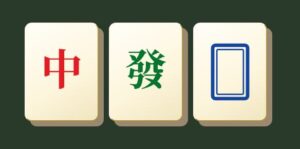
The Dragon tiles are another group you’ll encounter around the board. There are three types, commonly known as Red, Green and White Dragons. Each Dragon must be paired with another of the same type.

Flower Tiles
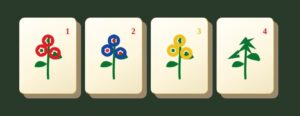
Flowers work differently from ordinary Mahjong Solitaire tiles. The individual Flower designs do not need to be identical in our game. Any free Flower tile can be matched with any other free Flower tile. 

Season Tiles
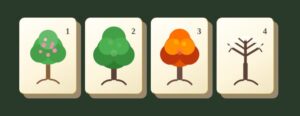
Season tiles follow the same special rule as Flowers. Although the four tiles have different designs, any free Season can be matched with another free Season.

How to Play Mahjong Solitaire

The goal is to remove every tile from the board by finding and matching pairs. However, you can only select tiles that are currently free.

Finding Free Tiles

A tile is free when no other tile is covering it and at least one of its sides, right or left is open.

That means a tile with another tile sitting on top of it cannot be selected. A tile that is uncovered but trapped by tiles on both its left and right sides is also blocked.

As you remove pairs, previously blocked tiles become available and new matching possibilities appear.

Matching and Removing Tiles

Select a free tile and then select a second free tile that matches it. If the pair is valid, both tiles are removed from the board.

For the numbered Bamboo, Circle and Character suits, as well as Winds and Dragons, the two tiles need to match exactly. Flowers and Seasons are the exceptions: any Flower can pair with another Flower, and any Season can pair with another Season.

Removing a pair counts as a move and can change the board considerably. A single match might uncover tiles beneath it, open the side of a neighbouring tile or do both at once.

This is why it’s worth looking beyond the pair you’re about to remove and considering what the move will make available next.

Clearing the Board

You win by successfully removing every tile.

Each new deal in our Mahjong Solitaire game is generated with a valid solution, so the board can be cleared when play begins. However, there may be several matching pairs available at the same time, and choosing them in a different order can change what remains accessible later.

A solvable board therefore doesn’t guarantee that every possible sequence of moves will lead to a win.

What If There Are No More Moves?

It is possible to reach a position where tiles remain on the board but none of the free tiles can be matched.

When this happens, the game lets you know that there are no more moves available. Because the original board had a solution, reaching a dead end means a different sequence of earlier matches may be needed.

You can use Undo to backtrack through previous matches and try another route. Alternatively, you can start a new game if you’d rather begin again.

Mahjong Solitaire Strategy

Mahjong Solitaire rewards observation, but good play also involves thinking about how the board will change after each pair disappears. Two perfectly legal matches aren’t necessarily equally useful.

Prioritise Tiles That Free Other Tiles

When you have several possible matches, look at what each pair is currently blocking. Removing two tiles that expose several new ones can be much more useful than removing a pair sitting harmlessly on an already open edge. The more tiles you make available, the more choices you’re likely to have on later moves.

Work Down High Stacks and Open the Sides

Tiles at the top of a stack can prevent several layers underneath from being played. At the same time, tiles at the ends of long rows can keep neighbouring tiles blocked from the side. Try to make progress in both directions. Reducing high sections exposes covered tiles, while clearing the outer edges opens the sides of tiles farther towards the centre. Concentrating entirely on one small area can leave the rest of the board difficult to unlock.

Don’t Automatically Take the First Match

Spotting a pair doesn’t mean you have to remove it immediately. Before making the match, check whether either tile is currently freeing something important. There may be another copy of the same tile elsewhere that would make a more useful pairing. Sometimes leaving an easy match untouched gives you more options later.

Be Careful When Several Identical Tiles Are Free

This becomes especially important when three or four matching copies of the same tile are available. Suppose you can see three identical tiles. You know that any two of them form a valid pair, but the choice of two may affect whether the remaining copy can eventually reach its partner. Look at what each tile is covering or blocking before deciding which two to remove. Matching the most obvious pair can occasionally create problems much later in the puzzle.

Use Flowers and Seasons to Your Advantage

Flowers and Seasons give you extra flexibility because the individual designs within each group don’t have to match. If several Flowers are available, for example, don’t automatically pair the first two you see. Consider which combination will expose the most useful tiles.

The same applies to Seasons. Their flexible matching rule can make them particularly helpful for opening difficult parts of the layout.

Using Hint, Undo and Shuffle Strategically

The Hint button highlights an available matching pair when you’re struggling to spot your next move. A hint shows you a legal match, but that doesn’t necessarily mean it’s the best strategic match available. Take a moment to look around the board before automatically playing the suggested pair.

Undo is especially useful if you realise an earlier match has left you in a difficult position. You can restore previously removed pairs and explore a different sequence of moves. If you reach a dead end, working backwards with Undo can help you find where another choice might have kept the board open.

Shuffle offers a more complete restart. If you feel like you’re absolutely stuck and don’t want to trace your steps backwards with the undo button to find where things went wrong then shuffle will give you a fresh start.

A Little Bit of Mahjong Solitaire History

Although Mahjong Solitaire uses the familiar tiles associated with Mahjong, the matching puzzle itself has a much more recent history.

One of the earliest documented computer versions was created in 1981 by programmer Brodie Lockard on the PLATO computer system. Called Mah-Jongg, the game used Mahjong tiles in a single-player puzzle where the player removed matching pairs from a layered arrangement.

Mahjong Solitaire reached a much wider audience a few years later. In 1986, Activision released Shanghai, also programmed by Lockard, for home computers including the Macintosh, Amiga, Atari ST and IBM-compatible PCs. The game became a major success and helped establish the stacked-tile matching format that players still recognise today.

Over the years, Mahjong Solitaire has appeared under a variety of names and in countless computer, mobile and browser versions. Layouts and extra features have evolved, but the central challenge has remained the same.

About Our Open-Source Foundation

The Mahjong Solitaire game here on Evergreen Arcade was developed using the open-source Mah Mahjong Solitaire project by ffalt as a foundation. Mah is released under the MIT License and provides an open-source implementation of Mahjong Solitaire, including a large collection of board layouts.

We’ve adapted and customised the game for Evergreen Arcade, making our own changes to its presentation, gameplay features and overall experience while building on that open-source foundation.

Source project: ffalt/mah on GitHub
Licence: MIT License

Want to play more puzzle and logic games?

Check out more puzzle and logic games below

Snake

Play Snake online for free and guide Marty through this classic game. Eat apples, collect bonus oranges, grow longer and see

Word Search

Play Word Search online for free with different themes and difficulty levels. Find hidden words forwards, backwards and diagonally across randomly

Crack the Code

Crack Prof. Marty's secret code in this code-breaking logic game. Use deduction and feedback clues to find all four colours in

Nonogram

Play Nonogram online for free! Choose 5x5, 10x10, 15x15 or 20x20 boards and solve logic puzzles that sometimes reveal hidden pictures.

Peg Solitaire

Solve the classic, free Peg Solitaire puzzle by jumping and removing pegs until only one remains. Every move matters in this

Sudoku

Play Sudoku online with Easy, Medium, and Hard puzzles. Use notes, hints, and beat the clock while solving every grid with